
Key Takeaways:
- Accurate time tracking is crucial for law firms: it ensures client trust, compliance with ethical rules, and maximizes billable hours.
- Manual timekeeping (paper, spreadsheets) is simple and low-cost initially, but it often misses 20–30% of billable time.
- Automated time-tracking software runs in the background, capturing all work hours and reducing errors. It often recovers 15–20% of previously missed billable time.
- Switching to modern timekeeping systems requires adoption and budget, but yields significant ROI: firms often recoup costs quickly by billing additional hours they once missed.
- Firms should consider user privacy, data security, and integration with legal practice management. Modern tools like Time Miner offer secure, law-firm-friendly automated tracking that complies with ethics and privacy standards.
Introduction
Time tracking plays a critical role in legal operations, where every client call, email, document review, and
consultation contributes to billable work. Law firms depend on accurate time records to maintain profitability,
ensure transparent billing, and stay compliant with professional standards. Yet many firms still struggle with
incomplete records, delayed entries, and missed billable hours.
For attorneys and legal teams, even small tracking gaps can lead to significant revenue loss over time. Studies
suggest that delayed or forgotten entries can result in firms losing a substantial portion of billable time each
month. Manual methods may appear simple at first, but they often create inconsistencies, administrative burden, and
reliance on memory, especially in fast-paced legal environments.
As legal workflows become increasingly digital, firms are evaluating automated solutions to improve accuracy, reduce
operational inefficiencies, and recover overlooked billable work. The conversation is no longer about whether time
tracking is important — it is about choosing the approach that works best for your team, workflow, and long-term
growth.
Time Tracking Challenges in Law Firms
Many law firms still rely on manual timesheets out of habit or cost concerns. However, accurate timekeeping is
fundamental to firm ethics and profitability. ABA Model Rule 1.5 requires that legal fees reflect the time spent on
each matter, so lawyers must maintain detailed, timely records. Comprehensive entries create an audit trail, giving
clients confidence in invoices and helping firms avoid disputes.
Delaying or estimating entries leads to lost revenue: waiting just 24 hours to record time can lose roughly 25% of
billable hours.
These small gaps compound into tens of thousands of dollars per attorney each year. Attorneys also
spend hours every month correcting manual timesheets and chasing missing logs, creating administrative drag and
stress.
These challenges are especially acute in a remote or hybrid era: lawyers often switch tasks or work off-site, and
short activities (quick calls, document edits) get forgotten. To address this, many experts now recommend adopting
modern Timekeeping Software. By automating timers and entry approvals,
these tools improve accuracy and save time.
What is Manual Time Tracking ?
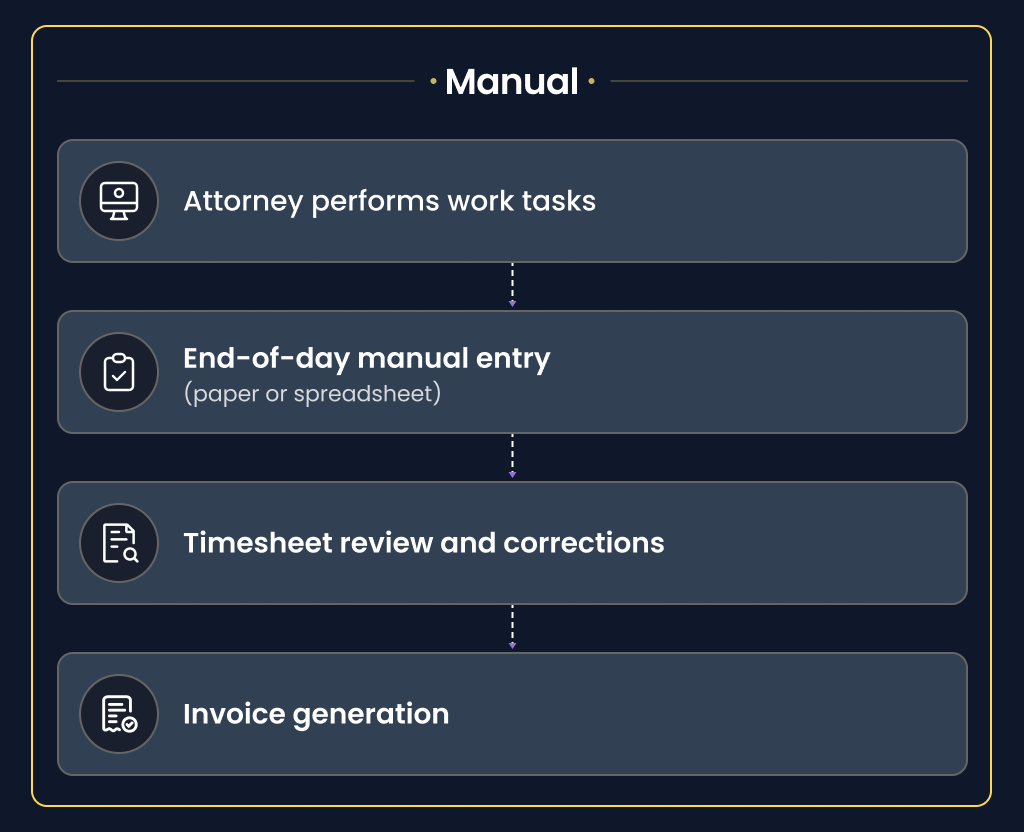
Manual methods (paper logs, punch clocks or spreadsheets) appeal for their simplicity and low initial cost. Small
firms and solo attorneys often start this way because no new software is needed. Lawyers maintain direct control
over entries, and the process is familiar. In workflows with a few simple projects or fixed-fee work, manual
tracking can be sufficient initially.
Pros of Manual Tracking: Straightforward setup requiring minimal training or expense. Attorneys directly
verify each
entry, which some find reassuring. There is virtually no new software cost, making it accessible for very small
practices.
Cons of Manual Tracking: Highly error-prone and incomplete. Lawyers often forget to start or stop timers or
may
round hours to simplify logging. Manual data entry is time-consuming, and errors require review and correction.
Studies estimate that manual timekeeping errors can cost firms up to 7–8% of payroll. Ultimately, these gaps mean
significant lost billable time and lower profitability for growing teams.
What is Automated Time Tracking software?
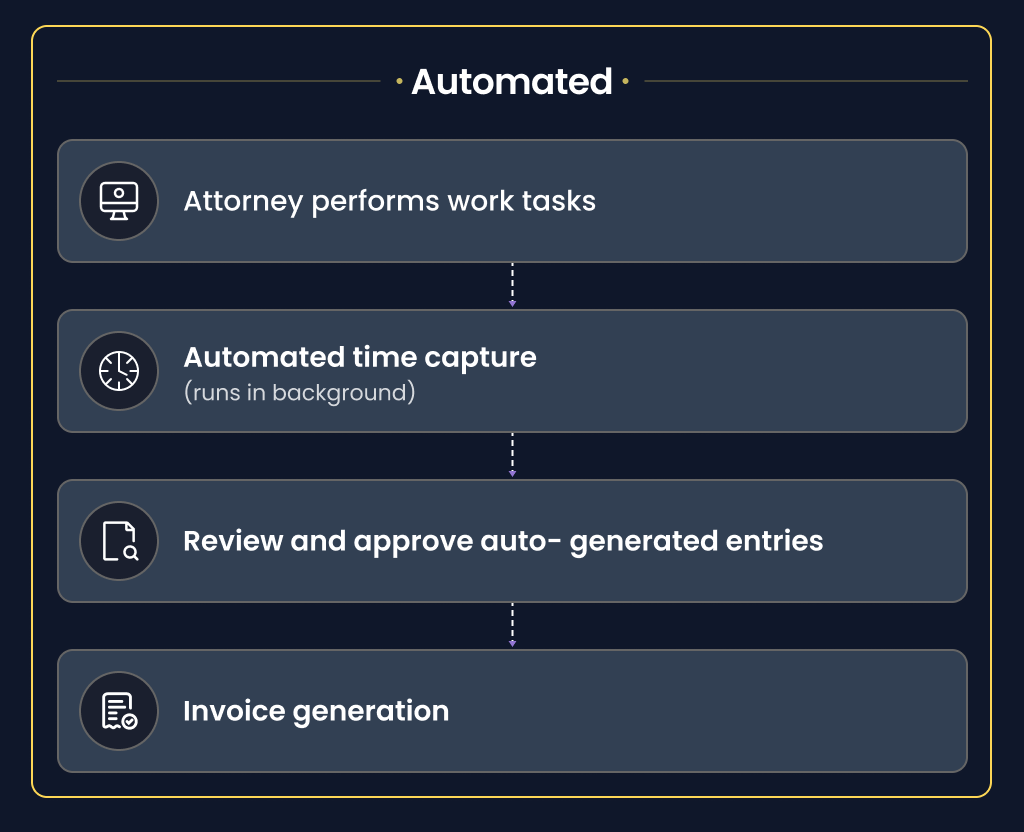
It uses AI and background timers to record work hours without needing constant manual input. It runs silently on
lawyers’ devices, logging apps used, documents edited, and calendar events attended. Afterward, attorneys simply
review and approve the auto-generated timeline. Compared to manual logs, automation dramatically reduces unrecorded
time. Firms that switch to automated tracking typically recover 15–20% more billable hours than before.
Pros of Automated Tracking: Significantly higher accuracy and coverage. Automation captures incidental tasks
(like
emails or brief calls) that attorneys often forget, providing a truer picture of work. It eliminates routine entry
errors and yields consistent, reliable records. Automated tools generate real-time data and analytics: utilization
reports, project summaries, and dashboards become available instantly. Overall, firms report higher revenue and
faster billing; one study found automated users capture 15–20% more hours and speed up invoicing by ~25–30%.
Cons of Automated Tracking: Requires investment in software and training. Even if ROI is high, the upfront
cost can
deter very small firms. There is a learning curve: attorneys and staff must adapt to a new interface. Some users may
initially resist feeling “watched,” though many modern tools emphasize privacy controls (data is often visible only
to the user until approved). Firms must ensure the chosen platform integrates with legal billing systems and meets
security standards. In practice, most providers allow hybrid use – automated capture with optional manual edits –
combining convenience with oversight.
Manual vs Automated: Pros and Cons for Law Firms
| Aspect | Manual Time Tracking | Automated Time Tracking |
|---|---|---|
| Accuracy | Relies on human memory; many small tasks get missed or rounded off. Requires time-consuming corrections. | Tracks time continuously, minimizing omissions and rounding. AI assistants further improve precision. |
| Billable Hours Recovered | Frequently misses 20–30% of billable work, shrinking revenue. | Captures incidental and overlapping tasks, typically adding back ~15–20% more billable hours. |
| Administrative Overhead | High – attorneys and staff spend significant time on data entry, timesheet reviews and corrections. Billing is slower and often delayed. | Low – time entries generate automatically, so invoicing is faster. Management spends less time on data cleanup. |
| Upfront Cost | Very low (paper, spreadsheets). However, long-term losses accumulate via inefficiency. | Higher initial cost (software subscription). ROI comes from saved time and added revenue. |
| Compliance & Ethics | Vague or late logs can conflict with billing rules and client expectations. Poor records risk disputes or compliance issues. | Detailed, timestamped records support billing transparency. Many automated tools align with ABA guidelines, helping maintain ethical compliance. |
| User Adoption | Conceptually simple but relies on habit. Attorneys often find manual tracking tedious, lowering compliance. | Requires change management. Good software (with mobile apps and reminders) can achieve high adoption. Investing in an easy interface and training boosts compliance. |
| Mobility & Remote Work | Manual methods require ad-hoc entries when away from desk; short tasks offsite may not get logged. | Built for anywhere use: desktop + mobile apps. Work done offsite (e.g. reviewing documents, calls) is automatically tracked and synced. |
| Scalability | Doesn’t scale well – as the team grows, errors and administrative effort grow exponentially. | Scales easily – the same automated system can serve a few lawyers or an entire firm. Analytics help manage a growing practice’s utilization and budgets. |
Modern timekeeping solutions like Time Miner exemplify how law firms can automate time tracking securely and accurately. By integrating with practice management and respecting privacy, these platforms help firms capture every billable moment and maintain compliance.
Choosing the Best Approach for Your Firm
Each firm’s situation is unique. Solo lawyers or very small firms may manage with manual methods initially, especially for flat-fee work or very simple case loads. However, even fixed-fee firms often track internal hours to analyze costs. Larger firms and those billing hourly generally benefit more from automation. Key factors to consider include:
- Billing Strategies: Law firms may use hourly, Flat-Fee or hybrid arrangements. Even under value- or fixed-fee pricing, capturing actual time (billable and non-billable) gives insight into costs and client profitability.
- Workflow Fit: If attorneys handle many clients or frequent interruptions, automated capture ensures nothing is missed. For very predictable schedules, manual tracking might suffice short-term.
- Budget and ROI: Compare software cost with the value of recovered billable hours. Case studies show firms often recover their investment quickly by billing additional hours they previously lost.
- Technology Adoption: Choose user-friendly software with mobile access and integration into practice management. A phased rollout and clear policy can turn time tracking into a seamless routine.
- Privacy & Security: Ensure the system meets law office standards (e.g. encrypted data, GDPR/ABA compliance). Many tools operate “privacy-first” (raw activity remains visible only to the user) to respect confidentiality.
- Reporting Needs: Automated tools often include dashboards (utilization, budgeting, lawyer performance). If you require these analytics, automation saves the effort of compiling spreadsheets.
Ultimately, many firms find a hybrid approach works best: automated tracking with the option for quick manual edits. This ensures coverage of all tasks while letting attorneys verify entries. Whether starting manual or jumping to software, the goal is consistent, accurate time data that reflects actual work.
Conclusion
Accurate time tracking is non-negotiable for law firms. Manual methods may suffice for very small or fixed-fee practices, but they incur hidden costs in lost revenue and extra admin time. Automated tracking software offers superior accuracy, analytics, and efficiency. By adopting such tools (like Time Miner), legal teams can recover lost billable hours, speed up invoicing, and focus more on client service. In short, modern timekeeping solutions empower firms to optimize profitability while maintaining billing ethics.
FAQs
Q.1 What is the difference between manual and automated time tracking?
Manual tracking requires employees to enter their work hours themselves, while automated tracking records activities digitally with minimal manual input. Automated systems typically improve accuracy and reduce administrative workload.
Q.2 Why do law firms lose billable hours with manual tracking?
Attorneys often switch between tasks quickly throughout the day. Short calls, emails, and client interactions may be forgotten when time is logged manually later. This results in unbilled work and revenue loss.
Q.3 Is automated time tracking suitable for solo attorneys?
Yes. Solo attorneys can benefit from automation by reducing time spent on administrative tasks and improving billing consistency. It also helps capture overlooked activities more effectively.
Q.4 Can automated tracking improve billing accuracy?
Yes. Automated systems capture activities in real time, reducing reliance on memory and minimizing human error. This leads to more reliable invoices and reporting.
Q.5 Is automated time tracking secure for legal firms?
Modern solutions are designed with security and privacy protections to support professional environments. Law firms should always choose platforms that prioritize secure data handling and confidentiality.